Missile Defense
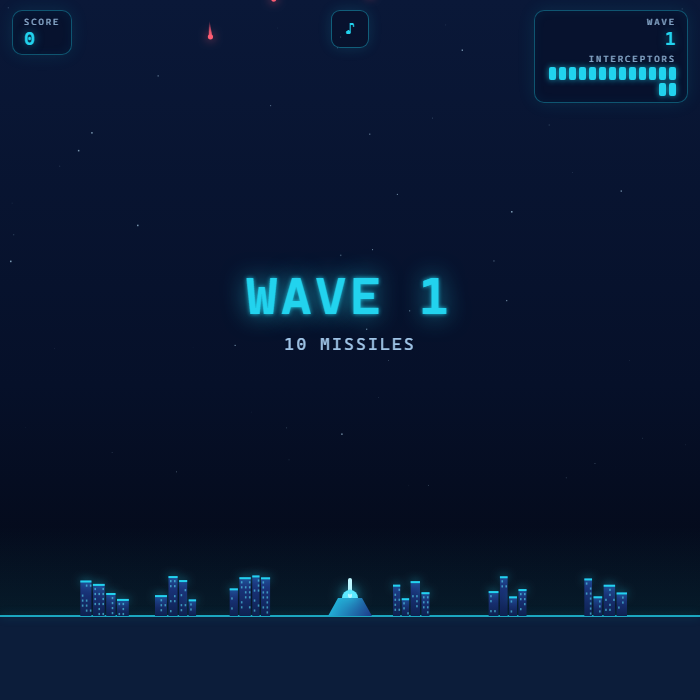
Defend six neon cities from raining missiles. Tap to fire interceptors that bloom into expanding blast rings, chain explosions, and clear escalating waves of splitters and bombers.
About Missile Defense
Missile Defense is a fast, neon take on the classic city-defense arcade game. Glowing enemy missiles streak down from the night sky toward six cities and your central battery; each tap launches an interceptor that flies to your aim point and detonates into a bright blast ring. Anything the ring touches is destroyed, and the resulting chain explosions can take out clusters of incoming fire at once. You only get a limited magazine of interceptors per wave, so every shot has to count. Survive a wave to bank a clearance bonus, then face faster missiles, splitters that fork mid-flight, and bomber planes that drop payloads from the side. It is built entirely with hand-drawn Canvas art and synthesized WebAudio sound, with screen shake, slow-motion city hits, particle debris, and a cohesive cyan-on-deep-blue look. Lose all your cities and it is over, but your best score and best wave are saved between runs.
How to play Missile Defense
Enemy missiles fall toward your cities along the bottom of the screen. Aim at a point in the sky and fire an interceptor; it travels there and explodes into an expanding ring that destroys any missile it touches. Time your shots so the blast is open when missiles pass through it, and let chain reactions do extra work. Each wave gives you a fixed number of interceptors that reload between waves, so spend them wisely. Clear every missile and bomber in a wave to earn a bonus based on leftover interceptors and surviving cities. Difficulty climbs each wave with more and faster missiles, mid-air splitters, and bomber planes. The game ends when all six cities are destroyed.
Controls
Mouse/touch: tap or click anywhere in the sky to fire an interceptor at that point; move to reposition the crosshair. Keyboard: Arrow keys or WASD move the crosshair, Space (or Enter) fires. M toggles mute. Any key, tap, or the Play button starts a fresh game from the demo screen.
Tips & tricks
- Aim ahead of fast missiles - the interceptor takes time to fly up, and the blast needs to already be open when the missile arrives.
- Wait for missiles to cluster, then drop one blast among them to trigger chain explosions and clear several at once.
- Splitters (amber trails) fork into multiple missiles around mid-screen - intercept them high, before they split.
- Bombers are worth big points and keep dropping payloads, so swat them early to stop the extra missiles.
- You score a bonus for unused interceptors and surviving cities each wave, so do not waste shots once the sky is clear.
Frequently asked questions
How do you play Missile Defense?
Enemy missiles fall toward your cities along the bottom of the screen. Aim at a point in the sky and fire an interceptor; it travels there and explodes into an expanding ring that destroys any missile it touches. Time your shots so the blast is open when missiles pass through it, and let chain reactions do extra work. Each wave gives you a fixed number of interceptors that reload between waves, so spend them wisely. Clear every missile and bomber in a wave to earn a bonus based on leftover interceptors and surviving cities. Difficulty climbs each wave with more and faster missiles, mid-air splitters, and bomber planes. The game ends when all six cities are destroyed.
What are the controls for Missile Defense?
Mouse/touch: tap or click anywhere in the sky to fire an interceptor at that point; move to reposition the crosshair. Keyboard: Arrow keys or WASD move the crosshair, Space (or Enter) fires. M toggles mute. Any key, tap, or the Play button starts a fresh game from the demo screen.
Is Missile Defense free to play online?
Yes — Missile Defense is completely free on GameStudioHub. There's no download, no install and no sign-up; it opens and plays right in your browser.
Can I play Missile Defense on mobile?
Yes. Missile Defense works in any modern mobile browser with full touch support, so it plays on phones and tablets as well as on a laptop or desktop — nothing to install.
Who made Missile Defense?
Missile Defense was built in-house by the GameStudioHub team using open web technology (HTML5), which is why it runs instantly without any download.
More free arcade games
Missile Defense is one of many free arcade games on GameStudioHub. Browse the whole Arcade collection, or head back to the home page to explore every category.