FreeCell
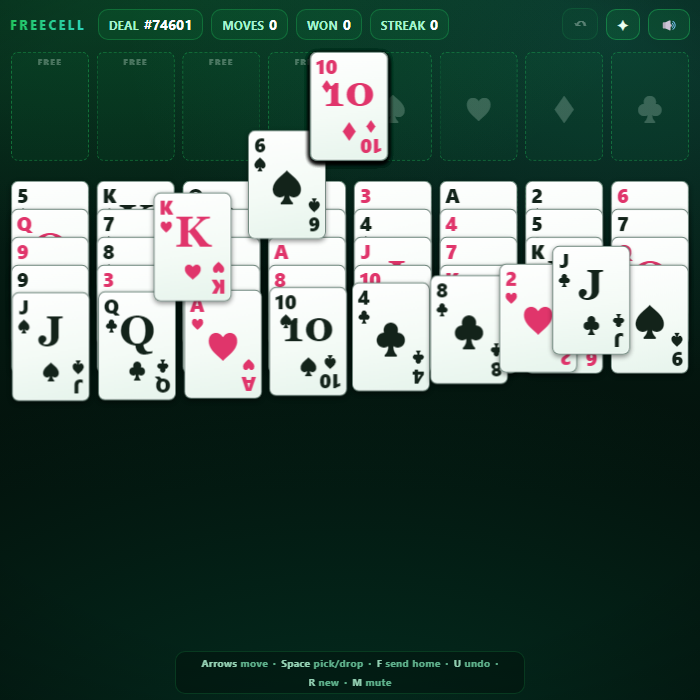
A polished, fully open-information take on FreeCell solitaire. All 52 cards are dealt face-up, so with patience nearly every deal can be solved. Use four free cells as temporary parking, build tidy alternating-color runs in the cascades, and race the whole deck home to the four foundations.
About FreeCell
FreeCell is the thinking person's solitaire: every card is visible from the very first move, so winning is about planning rather than luck. This version deals 52 cards into eight cascades with four open free cells and four suit foundations. Smart supermoves let you slide whole ordered runs at once (limited by your open cells and empty columns), safe cards fly home automatically, and an Auto button finishes the deal the moment it becomes unstoppable. Drag with mouse or touch, or play entirely from the keyboard with a glowing cursor. Built as a single self-contained file with hand-drawn CSS cards, synthesized sound, seeded deals, and saved win/streak stats.
How to play FreeCell
Move every card to the four foundations, building each suit up from Ace to King. The eight cascades build downward in alternating colors (red on black, black on red). Each of the four free cells holds exactly one card as temporary storage. You can move an ordered run of cards in one go as long as it fits the supermove limit: (1 + open free cells) x 2^(empty columns). Tap or click a card to auto-send it to a foundation, a matching cascade, or an open free cell. Clear the whole deck to win, then chase a longer win streak on the next deal.
Controls
Mouse/touch: drag a card or a valid run onto a legal cascade, free cell, or foundation; single-tap a card to auto-place it (foundation first, then cascade, then a free cell). Keyboard: Arrow keys or WASD move the cursor; Space/Enter picks up the run under the cursor and drops it on the next spot (press again on the same column to select a deeper card); F sends the cursor's top card home; U or Ctrl+Z undoes; R or N deals a new game; M toggles mute; E runs Auto-finish when available.
Tips & tricks
- Empty a whole column early - an empty cascade doubles how many cards you can move at once, and combined with free cells it lets you shift long runs.
- Keep at least one free cell open whenever you can; filling all four with stray cards is the fastest way to get stuck.
- Plan a route to dig out the Aces and low cards first, since they unlock everything above them on the foundations.
- Don't rush every card home - a card sent to a foundation too early can't come back to act as a parent for a run you still need to build.
- Build long alternating-color sequences in the cascades; a tidy K-Q-J-10 run can be relocated in a single supermove to expose buried cards.
Frequently asked questions
How do you play FreeCell?
Move every card to the four foundations, building each suit up from Ace to King. The eight cascades build downward in alternating colors (red on black, black on red). Each of the four free cells holds exactly one card as temporary storage. You can move an ordered run of cards in one go as long as it fits the supermove limit: (1 + open free cells) x 2^(empty columns). Tap or click a card to auto-send it to a foundation, a matching cascade, or an open free cell. Clear the whole deck to win, then chase a longer win streak on the next deal.
What are the controls for FreeCell?
Mouse/touch: drag a card or a valid run onto a legal cascade, free cell, or foundation; single-tap a card to auto-place it (foundation first, then cascade, then a free cell). Keyboard: Arrow keys or WASD move the cursor; Space/Enter picks up the run under the cursor and drops it on the next spot (press again on the same column to select a deeper card); F sends the cursor's top card home; U or Ctrl+Z undoes; R or N deals a new game; M toggles mute; E runs Auto-finish when available.
Is FreeCell free to play online?
It is. FreeCell costs nothing to play here — no account, no app store, no paywall. Just open the page and go.
Can I play FreeCell on mobile?
Yes. FreeCell works in any modern mobile browser with full touch support, so it plays on phones and tablets as well as on a laptop or desktop — nothing to install.
Who made FreeCell?
FreeCell was built in-house by the GameStudioHub team using open web technology (HTML5), which is why it runs instantly without any download.
More free casual games
FreeCell is one of many free casual games on GameStudioHub. Browse the whole Casual collection, or head back to the home page to explore every category.