Brain Quiz
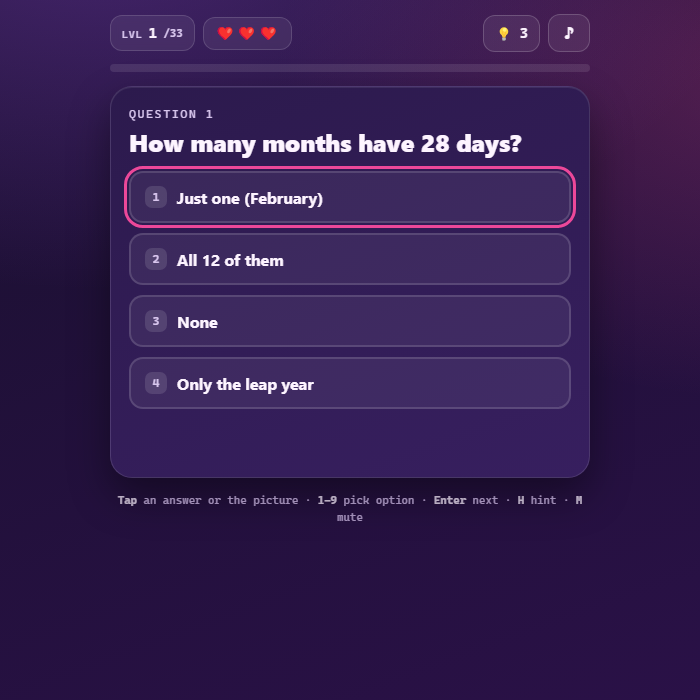
A tricky lateral-thinking quiz packed with 32 original brain-bending riddles. Tap answers, find the odd one out, spot the biggest, count things, and outsmart sneaky wordplay. Lives, hints, and a progress bar keep the pressure on. Family-friendly and fully self-contained.
About Brain Quiz
Brain Quiz is a witty lateral-thinking challenge in the spirit of classic "trick test" games, built entirely from scratch. Every one of its 32 questions is original and designed to make you think sideways: the obvious answer is almost always the wrong one. Some questions are tap-an-answer multiple choice, others ask you to interact directly with a little drawn or emoji scene, tap the biggest animal, find the hidden digit, spot the cup that is not full, or count the stars. Wrong guesses cost a life but earn a cheeky nudge in the right direction, and you can spend one of your hints whenever you are truly stuck. All art is drawn with Canvas and SVG, all sound is synthesized, and your furthest level is saved locally so you can come back and finish the gauntlet.
How to play Brain Quiz
Read each riddle carefully, then answer it. For multiple-choice questions, tap one of the option buttons (or press its number key). For interactive questions, tap the right object in the picture, the biggest, the odd one out, the hidden shape, and so on. A correct answer triggers confetti and unlocks the Next button; a wrong answer costs one of your three lives and shows a hint about what you missed. Stuck? Tap the lightbulb to spend a hint and reveal a clue. Clear all 32 questions without running out of lives to win. Run out of lives and you can try again from the top. Your furthest level is remembered between sessions.
Controls
Mouse/touch: tap an answer option or tap an object in the picture; tap Next to advance; tap the lightbulb for a hint; tap the note icon to mute. Keyboard: number keys 1-9 pick an option (or a tap target), Up/Down/Left/Right or WASD move the on-screen selection, Enter selects the highlighted option and also advances to the next question, H uses a hint, M toggles mute. Any key or tap on the start screen begins a fresh game.
Tips & tricks
- The first answer that pops into your head is usually the trap, read every word literally before you commit.
- Pay attention to wording like 'all but', 'survivors', or 'becomes shorter', the trick is often hidden in a single phrase.
- For tap questions, think about real life, not what is on screen: a tiny elephant emoji is still the biggest animal.
- Save your three hints for the riddles that genuinely stump you rather than burning them early.
- Wrong answers cost a life but always explain the catch, use that nudge to retrain how you read the next question.
Frequently asked questions
How do you play Brain Quiz?
Read each riddle carefully, then answer it. For multiple-choice questions, tap one of the option buttons (or press its number key). For interactive questions, tap the right object in the picture, the biggest, the odd one out, the hidden shape, and so on. A correct answer triggers confetti and unlocks the Next button; a wrong answer costs one of your three lives and shows a hint about what you missed. Stuck? Tap the lightbulb to spend a hint and reveal a clue. Clear all 32 questions without running out of lives to win. Run out of lives and you can try again from the top. Your furthest level is remembered between sessions.
What are the controls for Brain Quiz?
Mouse/touch: tap an answer option or tap an object in the picture; tap Next to advance; tap the lightbulb for a hint; tap the note icon to mute. Keyboard: number keys 1-9 pick an option (or a tap target), Up/Down/Left/Right or WASD move the on-screen selection, Enter selects the highlighted option and also advances to the next question, H uses a hint, M toggles mute. Any key or tap on the start screen begins a fresh game.
Is Brain Quiz free to play online?
Yes — Brain Quiz is completely free on GameStudioHub. There's no download, no install and no sign-up; it opens and plays right in your browser.
Can I play Brain Quiz on mobile?
Yes. Brain Quiz works in any modern mobile browser with full touch support, so it plays on phones and tablets as well as on a laptop or desktop — nothing to install.
Who made Brain Quiz?
Brain Quiz was built in-house by the GameStudioHub team using open web technology (HTML5), which is why it runs instantly without any download.
More free puzzle games
Brain Quiz is one of many free puzzle games on GameStudioHub. Browse the whole Puzzle collection, or head back to the home page to explore every category.